
Staff still walk the lane.
Commercial pitching machine self diagnostics should tell your staff what the machine already checked, not replace the open, mid-shift, and close walk you still owe every lane. On an Ultimate Trainer 3000, the computer looks for proper pitch speed and height each time a speed is selected. It also makes small day-to-day adjustments for temperature, humidity, and motor wear. If that automatic correction cannot restore the pitch, the machine calls for maintenance and the LCD points staff toward the area to inspect. That is a useful first screen. It is not a license to keep a lane open while a wheel, guard, or power feed looks wrong.
Schedule a batting cage consultation
This field guide is for the person who opens the cage, not the person comparing models. Use it to separate a real machine fault from a ball, power, or retrieval problem, and to decide when the lane stays closed. Model selection, guest speed labels, and cage layout live on other pages. Link to those when a check points there, then come back to the machine in front of you.
What Commercial Pitching Machine Self Diagnostics Can and Cannot Do.
A self-diagnostic is a built-in check the machine runs so staff do not have to guess at every miss. On the Ultimate Trainer 3000, Amusement Products describes two jobs for that system. The computer confirms pitch speed and height when a speed is selected. And it adjusts for temperature, humidity, and motor wear so the pitch stays in the strike zone. When the automatic correction cannot repair the problem, the LCD tells staff where to look.
That second job is the one operators misuse. A message that names a board, sensor, or wheel area is a pointer. It does not mean the lane is safe to reopen, and it does not mean the named part is the only cause. A worn ball, a loose feed, or a retrieval system that starved the machine can produce the same guest complaint as a failed motor check.
The 48-speed UT3020 is a different control surface. The Ultimate Trainer pitching machines page says batters pick baseball, fast-pitch softball, or slow-pitch softball on a touch-screen kiosk, then choose speed and pitch type. Do not paste UT3000 LCD steps onto a kiosk and call them the same check. Read the screen that is actually on that station, then follow that model’s manual for any code you do not recognize.
What the LCD is allowed to decide.
Let the display decide only the first fork: the machine is ready, the machine adjusted itself, or the machine wants a person. Do not let it decide that a lane with a damaged guard, a hot smell, or a wheel that will not stop is fine because no code appeared. NIOSH notes that machine hazards come from motion, force, and other energy. A machine can cause a contact injury whether it is on or off. A blank screen is not a clean bill of health.
Keep the manufacturer’s manual for each station in the office, not in a drawer across the building. If the LCD names a part and the manual’s next step is a powered test, that test belongs to a trained person. Opening staff can record the message, close the lane, and call parts. They should not invent a reset sequence from a photo in a group chat.
Run the Open, Mid-Shift, and Close Check.
Run the same short loop every day so a new closer can trust what the opener wrote. The loop has three passes. Open confirms the machine can throw a controlled pitch before the first guest. Mid-shift catches drift after heat, humidity, and ball wear show up. Close records anything that should not wait until tomorrow’s rush.
Do the visual pass before you energize the wheels. NIOSH’s machine-safety guidance starts with a simple question: know what makes the machine stop and go. If you cannot point to the stop control, the guard, and the power disconnect for that station, you are not ready to run a diagnostic.
- Walk the lane with power off. Confirm guards are in place, the wheel area is clear, and no ball is jammed in the feed.
- Check the ball supply. Confirm the hopper or retrieval feed has the ball type that station is set to throw, and that balls are round enough to feed.
- Restore power and read the display before anyone selects a speed. Write down any code exactly as it appears.
- Select one approved speed and watch one pitch. Confirm the ball reaches the intended height without a loud new noise or a visible wobble.
- If the display calls for maintenance, or the pitch is not repeatable, close the lane and log the message. Do not keep raising speed to “see if it clears.”
- At mid-shift, repeat the display read and one test pitch on any lane guests have flagged. At close, repeat the power-off visual and note parts you will need.
That order matters. A test pitch before the visual pass can put a hand, a net, or a loose ball in the wheel path. The machine is built to apply force. Do not stand in that path while it does. The NIOSH machine safety overview treats safeguards as protections that only work when they fit the whole task, not as a sticker you check once a year.
What to write in the lane log.
A useful log line has four fields. Record the time, the station, the exact display text, and whether the lane stayed open. “Machine acted weird” helps nobody on the next shift. A clear line does the job. Example: Station 3, UT3000, LCD said wheel sensor, lane closed at 2:10 p.m., parts called. The closer and the technician can start from that fact.
If the machine adjusted itself and the test pitch looked right, say that too. A string of self-corrections on the same station is a maintenance clue even when no guest complained. Temperature and humidity changes are normal. A station that needs a correction every hour is not.
Separate a Machine Fault from Balls, Power, and Retrieval.
Most “the machine is down” calls are not a failed diagnostic. They are a feed, a ball, or a power problem wearing the costume of a machine fault. Split those before you order a board.
Start with the ball. The product page says Ultimate Trainer machines use air-filled tires that conform to the ball, including a ball that is already worn. That design keeps pitches usable longer, but it does not make a split, waterlogged, or wrong-size ball acceptable. If only one station misses and the LCD is quiet, pull three balls from that hopper and compare them with a known good ball before you touch the control board.
Then check how balls reach the machine. The same page says a hopper-fed indoor station holds about 300 balls, about an hour of operation, and then it needs a refill. An empty hopper looks like a dead machine if the closer never watched the feed. A Range-Pro retrieval system meters balls to stations that need them and shuts off when machines are full. If every station starves at once, inspect the retrieval conveyor and its computer before you condemn the pitching machines.
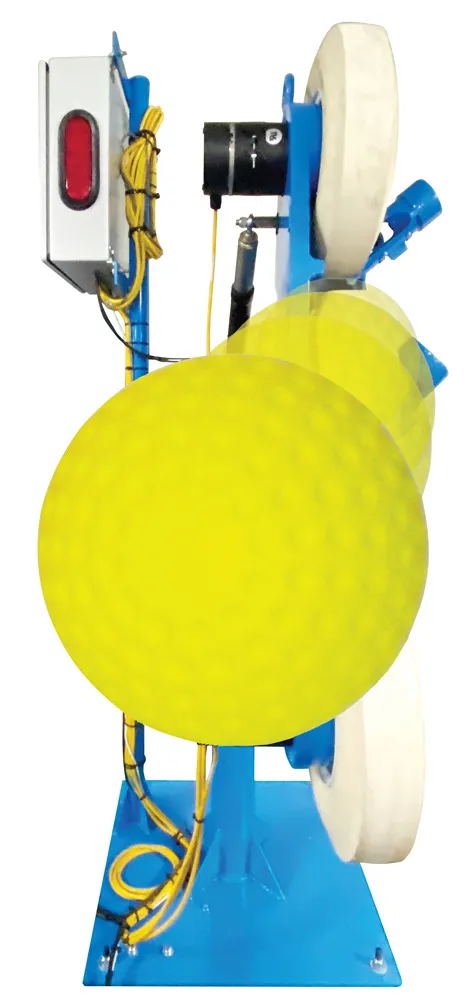
Power is the third fork. A dark LCD can mean the station lost power, the display failed, or someone stopped at the disconnect. Confirm the station’s power source and the stop control before you assume the self-diagnostic “did not run.” A machine with no power cannot report the fault that removed its power.
Only after balls, feed, and power check out should you treat the LCD message as a machine fault. That is when the display earns its keep. It narrows the search so a technician is not opening every cover on a Saturday. The Ultimate Trainer pitching machines page states this repair-time benefit directly: when self-diagnostics cannot repair the problem, the LCD tells staff where to look.
Use the Display Without Overriding the Machine.
Staff get into trouble when they treat the display as a menu to beat, not a report to read. The UT3000 already checks speed and height when a speed is selected, and it resets pitch height to the center of the strike zone after the cycle ends. If a batter’s last adjustment left the next pitch high, let the machine finish that reset before you call it a fault.
Do not “help” a self-check by holding a wheel, tapping a sensor, or selecting speeds in a rapid loop. Those moves add force and heat while the computer is trying to measure a normal pitch. If the manual says a code requires a powered test, assign that test to someone who has done it on that model. Everyone else logs the code and leaves the guard on.
Guest complaints about speed belong in a different guide. A pitch that feels too fast, or a label that does not match the session, is a settings question. Handle it with your batting cage pitching machine speed settings routine after the diagnostic says the station is healthy. Changing speed to mask a wobble or a new noise hides the fault and hands the next batter a worse pitch.
Codes you do not recognize.
Write the code, photograph the screen if your policy allows it, and stop. Do not search a random forum and try the first reset you find. Amusement Products builds these machines and stocks pitching-machine wheels, motors, and control parts. A wrong reset can turn a sensor message into a damaged board, and then the LCD is no longer telling the truth.
If two stations show the same new code on the same afternoon, treat that as a shared cause. Shared causes are usually power, ball supply, or a retrieval computer, not two identical part failures. Split the cause with the table below before you order two of anything.
Decide Whether the Lane Stays Open.
The stop-use rule should be short enough to say out loud. Close the lane if the display calls for maintenance. Close it if a guard is off, if you smell heat or see smoke, or if a wheel keeps turning after the stop command. Close it if a test pitch is not repeatable. Leave it closed until a named person clears it. “We’ll watch it for the next group” is how a small miss becomes a guest incident and a longer repair.
A lane can stay open when the visual pass is clean and the display is quiet. It can also stay open after a completed self-adjustment, if one test pitch matches the height and speed you selected. Say that in the log. An open lane with no log line is indistinguishable from a lane nobody checked.
| What you see. | Likely fork. | Lane status. | Next step. |
|---|---|---|---|
| LCD is quiet. One test pitch repeats. Guards are on. | The station is ready, or it finished a self-adjustment. | Open. | Log the pass and the time. |
| LCD calls for maintenance and names an area. | The automatic correction could not fix a machine fault. | Closed. | Log the exact text and call parts. |
| No balls reach the wheel. The LCD is quiet. | The hopper is empty, or retrieval is not feeding. | Closed until the feed is restored. | Refill or inspect retrieval, then retest. |
| The display is dark and there is no pitch. | Check power, the stop control, or a dead display. | Closed. | Confirm stop and power before any cover comes off. |
| You hear a new noise, see a wobble or heat, or a guard will not seat. | This is a mechanical hazard, with or without a code. | Closed. | Stop use and call a trained technician. |
| The pitch repeats, but guests say it feels fast. | This is a settings issue, not a failed diagnostic. | Open only if the check passed. | Use the speed-settings routine. Do not mask a fault. |
Review that table at the pre-shift meeting, not after a lane is already down. New staff remember a six-row chart better than a speech. The chart also keeps a closer from reopening a lane the opener closed for a wheel sensor.
Know When to Call Parts or Schedule Training.
Call parts when the LCD names a component. Call when the same station self-corrects all day. Also call when a visual defect needs a wheel, motor, or control part. The site header lists the public parts line as 1-423-892-7264, press 3 for Parts. Have the station number, model, and the exact display text ready. A clear call is faster than a photo of a half-open cabinet. If that number is not on the page you are looking at, use the contact page instead of a saved note.
Warranty questions belong on the limited warranty information page, not in a guess at the counter. Do not promise a guest or an owner that a code is covered. Read the warranty terms, then ask parts with the serial or station details in hand.
Training is the longer fix. The maintenance and operation class covers pitching machines along with other Amusement Products attractions. The maintenance training page currently lists the next session as March 4, 2027, at 5954 Brainerd Road in Chattanooga, and says lunch is provided. Read the registration details on that page before you book, because dates and costs change. Send the person who will own the lane log, not a different staffer every month.
Factory training does not replace the manual, and the manual does not replace the daily walk. A technician who understands the LCD still needs the opener to write down what the screen said at 9 a.m. Those two records together are what shorten repair time.
Plan the Cage So Checks Stay Possible.
A diagnostic routine fails when the building fights it. The open check will get skipped on busy Saturdays if the disconnect is blocked by a net pole. It will also get skipped if the manual is in another building, or if someone must cross an active lane to reach the stop control. That is a design problem, not a discipline problem.
Indoor cages make this obvious. A built-to-fit automated cage uses a sloped floor and a retrieval system. A free-standing cage uses hopper-fed machines on a flat floor and needs manual pickup. Those layouts change who refills balls and how fast a “dead machine” turns out to be an empty hopper. If you are still choosing that layout, use the indoor batting cage design guide for space and retrieval. Bring the check routine back here once the machines are in place.
Operators comparing a first batting-cage build, rather than a daily check, should start with the commercial pitching machine buyer guide. This article assumes the machine is already on the floor. Mixing the two jobs produces a post that neither buyer nor opener can use.
If the cage is still a drawing, a design consultation can place power, retrieval, and staff access so the open check is a two-minute walk instead of a climb. The company history dates Amusement Products LLC to 1994. The pitching-machine page says Ultimate Trainer machines have been manufactured since 1993, the year the About page lists the Ultimate Trainer patent. Tell the consultant which stations already show repeat LCD messages so the layout conversation includes service access, not only guest flow.
Request a design consultation before the next rebuild
Frequently Asked Questions.
What should commercial pitching machine self diagnostics tell an opener?
They should tell you whether the machine completed its own speed and height check, adjusted for conditions, or wants a person. On the UT3000, a maintenance call on the LCD means the automatic correction could not restore the pitch. Log the exact text and keep the lane closed until a trained person clears it.
Can staff ignore a code if the next pitch looks fine?
No. A pitch that looks fine after a maintenance call is not a passed check. The display already said the automatic repair failed. Reopening the lane because one ball “looked okay” skips the only warning the machine could give you.
Why does a quiet LCD still leave the lane closed?
A quiet or dark display does not prove the station is safe. Power loss, a dead screen, a missing guard, heat, or a wheel that will not stop are all reasons to close the lane with no code at all. Read the stop control and do the visual pass before you trust the absence of a message.
Who should call parts, and what should they say?
The person who saw the screen should call, or should hand the log line to the person who calls. Include station number, model, and the exact LCD text. Use the parts number printed in the current site header, 1-423-892-7264, and press 3 for Parts. Do not ship a guessed part number from an old photo.
Does this replace factory maintenance training?
No. The daily check keeps a lane from running with a known fault. Factory training teaches the people who will go past that check. The training page currently lists March 4, 2027, in Chattanooga. Confirm the date and registration details there before anyone travels.
Talk with Amusement Products about a cage that is already showing repeat maintenance calls