
A VR attraction without headsets can offer an immersive experience while letting guests see the space around them and interact more naturally with companions. For a family entertainment center (FEC), the phrase can describe several different formats, so it is worth looking beyond the label before selecting a system. This guide explains the main approaches, what to compare, and which questions help determine whether an installation fits your venue.
Request an FEC design consultation
What does VR without a headset mean?
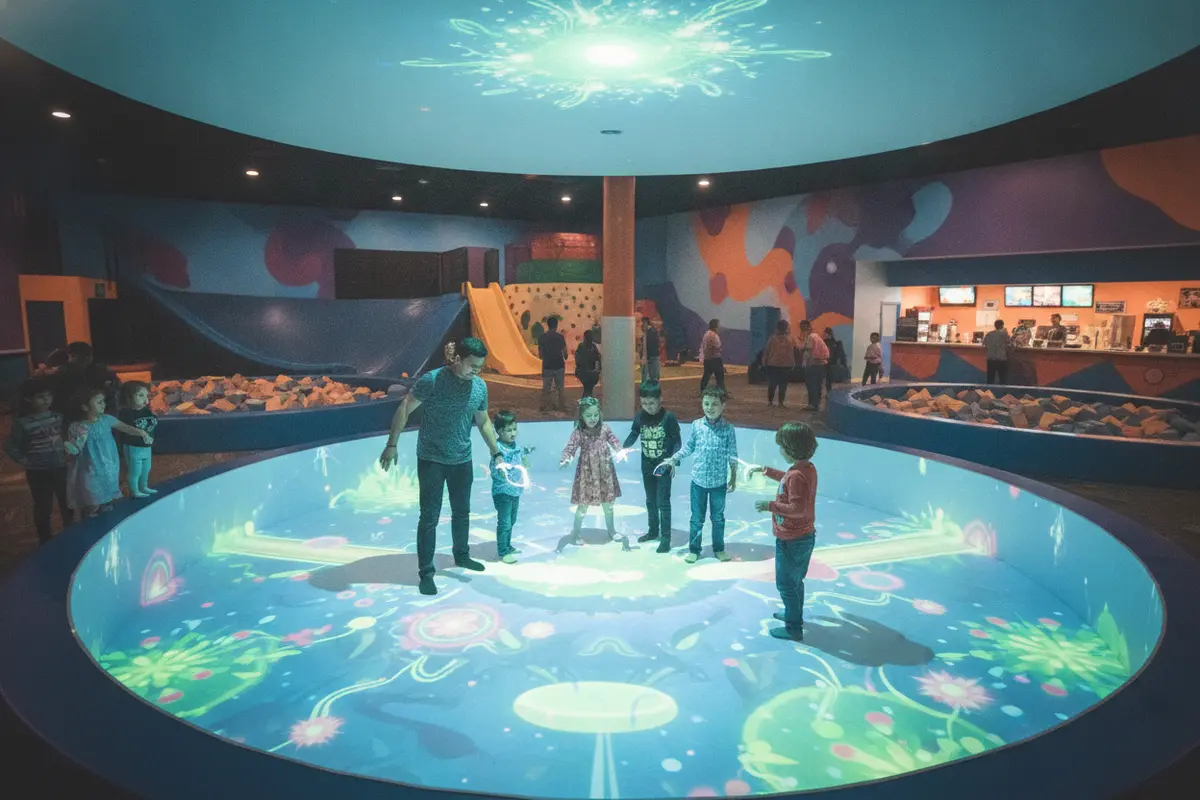
In conventional virtual reality, each guest wears a head-mounted display. A VR attraction without headsets shifts some or all of the visual experience to a shared environment. Images might be presented on walls or large displays, projected around a play area, or integrated with a physical attraction. A tracking or control system may let participants move, aim, or respond to on-screen events.
The label does not identify one standard product or guarantee a particular level of immersion. Two attractions described as “headset-free VR” may differ in display method, player capacity, interactivity, content, footprint, and operating procedure. Ask the supplier to show the actual guest experience and explain the system components, rather than relying on a category name.
Headset-free describes how guests view the experience. It does not by itself tell you whether the attraction is virtual reality, an interactive projection game, a simulator, or a hybrid. For an informed comparison, identify how the system tracks player movement, how guests interact, and whether the virtual content responds to those actions.
Which headset-free formats should you compare?
Start by considering the experience you want to offer and how it should fit your floor plan. These broad formats are useful for organizing a first conversation. Exact capabilities vary by system, so treat the table as a checklist rather than a specification sheet.
| Format | How guests experience it | Planning questions |
|---|---|---|
| Projection-based room | Images appear across one or more surfaces around a shared play area. | How much clear floor space is needed? How does lighting affect image visibility? Where do waiting guests stand? |
| Large-screen interactive attraction | Players respond to a large display using tracked movement or controls. | How many players can participate at once? Can spectators follow the action? How are turns managed? |
| Simulator or motion experience | Guests use a physical seat, platform, or vehicle while visuals create a virtual scene. | What are the loading and unloading steps? What access and supervision requirements apply? |
| Mixed physical and digital play | A physical play space or attraction is paired with responsive digital content. | What equipment is in the play zone? How is the boundary communicated and monitored? |
Some products may combine elements from more than one row. Ask for a live demonstration or representative video, including the complete guest cycle from entry to exit. A brief highlight clip may show the exciting moment but omit how participants enter, learn the controls, change turns, and leave the area.
Why might an FEC consider a VR attraction without headsets?
A shared visual experience can make it easier for groups to watch and talk to one another during play. That can be useful when your audience includes families, birthday groups, or guests who prefer not to wear a display. A visible room may also help staff explain where to stand and what to do, depending on the attraction’s design.
These are potential advantages, not guarantees. Some headset-free attractions still require guests to use hand controls, wear tracking devices, or follow specific movement rules. Others may rely on an individual screen or simulator rather than a shared room. Verify how the exact system works, and consider how your guests are likely to respond to the experience.
There can also be operational trade-offs. Projection areas may require control of ambient light. A shared room may need a clearly defined boundary and staff oversight. A simulator may have a more involved guest-changeover process. Compare the attraction with your existing mix, such as VR arena options and other FEC attractions in the equipment catalog, while checking whether the guest experience and operating needs suit your site.
How should you assess the guest experience?
Evaluate the attraction as a complete experience, not just as a display. Put yourself in the position of a first-time guest. Can people tell where to queue? Is it clear who can play and how many people can join a session? Can a spectator see what is happening? Are instructions understandable before play begins?
- Entry: Identify where a group approaches and where the next group waits. Avoid crossing the queue with the active play area.
- Orientation: Ask what a guest must understand before the session starts. Find out whether instructions are spoken, displayed, demonstrated, or given by an attendant.
- Participation: Confirm the number of players, the role of spectators, and how players are selected or rotated.
- Interaction: See how movement and controls work. Ask whether players need to carry, wear, or hold any equipment.
- Exit: Observe how the group leaves and whether staff need to reset, clean, or prepare anything before the next session.
Request a demonstration that includes a typical guest, not just an experienced operator. Notice whether people can understand the objective without repeated coaching. If children and adults will participate together, ask how the system accommodates differences in reach, movement, and familiarity with games. Do not assume that removing a headset eliminates the need for clear instructions or assistance.
What space and layout details matter?
Ask for the attraction’s documented footprint and distinguish the equipment footprint from the total operating area. The full area may also need room for queueing, entry and exit, staff access, viewing, and any required clearance. Have the supplier identify fixed equipment, service access, and any surfaces or environmental conditions that matter to the display.
Measure the proposed location and compare it with the layout drawings. Consider columns, doors, ceiling height, lighting, nearby windows, reflective surfaces, and the flow of guests moving between attractions. If the experience uses projection, clarify what ambient light conditions are recommended and whether other displays or lighting nearby can interfere with the intended effect. If it uses screens, check viewing angles from both the player area and spectator area.
Use a plan that shows the guest journey, not just the machine outline. Mark the queue, waiting area, accessible route, staff position, and points where guests enter or exit. Consider how groups behave at busy times: companions may gather around the play zone, and guests may stop to watch. A design review can help resolve these interactions before equipment is placed. Amusement Products offers design and consultation for attraction and FEC planning.
For a venue that is still comparing attraction types, also review relevant existing site plans and the placement of other activities. For example, miniature golf layouts and bumper car attractions have different circulation and guest-flow needs. The point is not to treat one format as a substitute for another, but to look at how each option contributes to the overall mix and floor plan.
How do you estimate throughput and staffing?
Ask the supplier to explain the operating cycle in practical terms. How long does a session take? How much time is needed to prepare between groups? Can the next group be oriented while the current one plays? Are there player limits or age, height, or other participation guidelines? Use the answers to build a realistic throughput estimate for your own operating plan; do not rely on a headline capacity number without its assumptions.
Map the staff tasks from opening to close. The team may need to greet participants, explain controls, start a session, watch the play area, help guests, and reset the experience. Confirm which tasks are required and which are optional. Ask whether a single attendant can supervise this attraction while carrying out other responsibilities, and test that assumption against busy periods and your venue’s supervision policy.
Look at the whole guest cycle. A short game can still produce a slow line if each group needs extensive instruction or if resetting takes time. A longer session might work well if spectators are engaged and the attraction’s capacity fits your goals. Compare the expected cycle with nearby attractions, the likely group size, and the amount of time visitors typically spend in that zone.
For technology questions, ask how operators monitor system status and what steps they follow when something does not work as expected. Amusement Products describes its VirTech system as part of its technology offerings; discuss with the company whether any relevant support or diagnostic tools apply to the specific attraction under consideration. Do not assume that a feature used by one product is available on another.
What safety and accessibility questions should you ask?
Request the manufacturer’s operating instructions, safety information, and any participation requirements for the exact model. Review them with the people responsible for operations and risk management at your venue. Ask what boundaries guests must stay within, what staff should monitor, and how the attraction should be stopped if a participant needs help.
Headset-free does not mean risk-free. Guests may move quickly, reach toward a display, interact with other players, or become absorbed in a game. Clarify what the attraction’s instructions say about movement, footwear, supervision, and use by children. Follow the manufacturer’s guidance and your own operating policies; do not infer safety requirements from a promotional video.
Discuss access early in the design process. Ask what adaptations or alternate participation options are available for guests with different mobility, sensory, or communication needs. Check the route into the area and whether controls and instructions can be understood by the audiences you serve. A supplier should be able to explain the intended use and limitations, but your venue must review how the installation works in its particular setting.
What should you confirm about technology and support?
Request a clear description of what is included in the proposed system: displays or projectors, computers, tracking equipment, controllers, software, content, and any network or power requirements. Ask which components are supplied by the attraction provider and which must be provided or prepared by your venue. Get the recommended environmental conditions and installation requirements in writing.
Clarify the content model. Find out what experiences are available at launch, whether new content can be added, and who handles updates. Ask how the system behaves if a content service or network connection is unavailable. Confirm the support process, operator training, warranty terms, maintenance tasks, and what information the service team needs when troubleshooting. These details affect day-to-day readiness as much as the attraction’s first demonstration.
For any equipment purchase, compare proposals on the same basis. Make a checklist of included hardware, installation responsibilities, software, training, support, and site preparation. If a system depends on a particular room configuration, ask who verifies that the proposed site meets it. Keep written answers with your planning documents so that decisions do not depend on assumptions made during a sales conversation.
How can you compare options before selecting one?
Use consistent criteria across vendors and attraction formats. Separate guest appeal from practical requirements. A system that looks compelling in a demo still needs to fit your building, operating model, audience, and attraction mix. Record open questions and assign someone to confirm each answer before you commit to a layout.
- What does the guest see, do, and control during a complete session?
- What is the total floor area needed, including queue, viewing, and staff access?
- What staffing, orientation, reset, and cleaning steps are part of normal operation?
- What participation restrictions, safety instructions, or supervision rules apply?
- What hardware, content, site work, training, and support are included?
- How does the attraction complement existing experiences and the planned guest journey?
Amusement Products is a manufacturer, distributor, and service provider for family entertainment center equipment, and it offers VR attractions through its portfolio. If you are comparing options, describe your venue, audience, available area, and operating goals when you contact the team. You can also review the company’s background and business information and its product gallery as you prepare questions.
For a wider view of the attractions industry, the International Association of Amusement Parks and Attractions is an industry association. Use supplier documentation and venue-specific review for the technical and operating details of any particular VR system.
How can you prepare for a design consultation?
A useful consultation begins with the constraints and outcomes you already know. You do not need to have selected a specific attraction. Bring a basic floor plan or measurements, note ceiling height and lighting conditions, and identify the spaces that may be available. If construction is underway, include the current project stage and any relevant deadlines.
Also prepare a short description of your audience and operating model. Note whether the venue is new or existing, what kinds of groups you serve, how staff are assigned, and what other attractions will sit nearby. Include the questions that matter most, such as shared play, player capacity, accessibility, content, training, support, and integration with the wider layout.
Ask the consultant to distinguish what is confirmed from what still needs technical verification. A productive next step is a written list of assumptions, measurements, supplier questions, and decisions. This makes it easier to compare alternatives and prevents a concept sketch from being mistaken for a complete installation plan.
Discuss your VR attraction plan with the design team
Frequently asked questions
Is every VR attraction without headsets a projection attraction?
No. The phrase can refer to several formats, including room projection, large interactive displays, simulators, or combinations of physical and digital elements. Ask how the specific system displays content and tracks or responds to the player.
Can guests play together in a headset-free VR attraction?
Some systems are designed around shared participation, while others may focus on one player at a time or use a simulator format. Confirm the number of active players, how spectators participate, and how turns change during the full guest cycle.
Does a headset-free system need less space?
Not necessarily. The display equipment may differ, but you still need to plan the play area, queue, viewing space, access, staff position, and any clearances specified by the supplier. Compare total operating footprint rather than equipment dimensions alone.
What information should I get before choosing a system?
Request the complete operating and technical requirements, including footprint, power and environmental needs, player capacity, instructions, safety information, staffing steps, content details, training, and support. Verify that the proposed installation suits your specific site.
Can a headset-free VR attraction work in an existing FEC?
It may, but suitability depends on the site, attraction footprint, lighting, guest flow, and the system’s installation requirements. Share measurements and a layout with the supplier or design team so potential constraints can be reviewed before you finalize a location.
Plan your next FEC attraction with a design consultation
When you compare a VR attraction without headsets, focus on the complete guest experience and the practical requirements behind it. Clear answers about space, staffing, safety, technology, and support will help you decide whether a format fits your FEC and what to verify next.